
Professional services automation (PSA) software gives services firms one system to manage people, projects, and money. Instead of juggling spreadsheets for timesheets, a separate tool for invoicing, and gut-feel staffing decisions, PSA platforms connect it all: who’s available, what they’re working on, and whether the project is actually making money. With that visibility, project managers capture every billable hour instead of losing billable hours, instead of losing them to bad timesheets, and catch a shrinking margin while there’s still time to fix it, turning services delivery from reactive firefighting into something predictable and repeatable.
Key features to look for
The best PSA software for your organization should include these key features.
- Resource management
Real-time visibility into who’s available, who’s overloaded, and who has the right skills for upcoming work. - Time and expense tracking
Simple enough that people actually use it, with approval workflows that don’t stall in someone’s inbox. - Billing and invoicing
Turns billable hours into invoices automatically, supporting fixed-fee, retainer, or hourly contracts. - Project financials
Budget versus actual spend in real time, so project managers catch problems in week three instead of at the final invoice. - Reporting and dashboards
Utilization, margin, cash flow, and project progress metrics in one view, so leaders can act on trends instead of guessing.
What are the best professional services automation software?
We did the research for you. Below are the top 5 best professional services automation software on the market, ranked.
| Rank | Product | Best For |
|---|---|---|
| 1 | OnePlan (Top Pick) | Firms that want portfolio management, financials, and resourcing handled in one platform, with automation built in throughout |
| 2 | Kantata | Resource management and billing automation for mid-to-large firms |
| 3 | Accelo | Quote-to-invoice automation for mid-size agencies |
| 4 | Scoro | All-in-one operations for firms that don’t need deep PSA specialization |
| 5 | Polaris PSA | Quote-to-cash efficiency and profitability tracking |
1. OnePlan
Best for: Firms that want portfolio management, financials, and resourcing handled in one platform, with automation built in throughout.
OnePlan combines strategic portfolio management, agile methodology, and PSA-style automation in one place, so teams aren’t stitching together separate tools for planning and delivery. It’s built natively on Microsoft 365, integrating with Teams, Planner, Project, and Azure DevOps rather than asking teams to leave the tools they already use.
Key features:
- Strategic & portfolio planning: connects corporate strategy to funded work, with scenario modeling to compare investment paths before committing budget
- Resource planning & management: capacity modeling and workload transparency across programs, not just single projects
- Financial planning: forecast-vs-actual budget tracking tied directly to the portfolio, not a bolted-on module
- Hybrid delivery support: manage agile, waterfall, and hybrid work in the same system
- Sofia AI: built-in AI assistant that surfaces risk, rebalances portfolios, and forecasts outcomes
- Time & effort tracking: tied to portfolio-level reporting
Where it fits: Best suited to firms, including PMOs and service delivery organizations, that need portfolio-level financial and resource visibility alongside project delivery, especially if they’re already invested in the Microsoft ecosystem.
2. Kantata
Best for: Resource management and billing automation for mid-to-large firms.
Kantata (formerly Mavenlink + Kimble) is strong at matching the right people to the right projects and turning tracked billable hours into accurate, automated billing. It includes core project management tools like task management, project tracking, Gantt charts, and project templates, plus time tracking and timesheet management, with differentiator features including resource planning, budgeting and invoicing, client collaboration, and integrations with Salesforce, Jira, Slack, and QuickBooks.
Key features:
- Resource optimization built on operations-management science for matching skills to project demand
- Automated invoicing generated from tracked time and expenses
- Both a Salesforce-native and an open infrastructure option, with over 1,200 prebuilt connectors including Salesforce, NetSuite, HubSpot, Workday, and Sage Intacct
- Client collaboration portal for shared task and document visibility
Trade-offs to weigh: Pricing starts around $45 per user, per month, and some reviewers note the interface and custom reporting can feel dated or require deeper configuration expertise to adjust.
Where it fits: Larger consulting, agency, and IT-services firms, particularly legal and accounting, advertising, media and marketing, architecture, engineering and construction, and management consulting, that need deep resourcing logic and already run on Salesforce.
3. Accelo
Best for: Quote-to-invoice automation for mid-size agencies.
Accelo covers the full client lifecycle end to end, so a deal moving through sales automatically triggers job setup, scheduling, and invoicing. Core features include integrated CRM, project management, time tracking and billing, retainer management, and resource planning, with a focus on “quote-to-cash” automation.
Key features:
- Full CRM built in, rather than relying on a third-party integration for sales-to-delivery handoff
- Automatic quote generation and one-click conversion into active jobs
- Retainer and recurring-revenue management alongside project billing
- Integrations with GSuite, QuickBooks, HubSpot, Stripe, PayPal, Airtable, and Slack
Trade-offs to weigh: Accelo doesn’t publish exact pricing and instead quotes per business based on modules and commitment level, which can make budgeting less predictable up front. It’s most suitable for small-to-medium professional services businesses, particularly IT services, marketing, engineering, and management consulting firms.
Where it fits: Agencies that want sales, delivery, and billing tightly automated in a single system without needing deep portfolio-level planning.
4. Scoro
Best for: All-in-one operations for firms that don’t need deep PSA specialization.
Scoro is a good middle ground if you want quoting, delivery, and invoicing in one system without a lot of PSA-specific configuration. It unites projects, resources, and finances in one system, so teams don’t need to juggle multiple tools for planning, tracking, and billing.
Key features:
- Project lifecycle tools covering scope estimation, planning, and invoicing, with a quoting/estimation matrix that breaks down deliverables by role and effort
- Resource planning and capacity forecasting to balance workloads and spot shortages
- An AI assistant, ELI, that interprets natural-language queries against business data
- Real-time budget monitoring and profitability forecasting at the role, service, and project level
- Built-in sales pipeline and CRM tools alongside delivery tracking
Trade-offs to weigh: Pricing starts around $19.90/user/month for Core, moving to $32.90 for Growth and $49.90 for Performance, with Enterprise custom-priced — resource planning and deeper forecasting tools typically require moving up a tier.
Where it fits: Mid-size professional services and creative agencies that want to replace multiple point tools — separate CRM, project tracker, timesheets, invoicing — with one unified platform, without the configuration overhead of an enterprise PSA suite.
5. Polaris PSA (Deltek)
Best for: Quote-to-cash efficiency and profitability tracking.
Polaris PSA is focused on surfacing where margin is being won or lost across the full quote-to-cash process, useful for firms watching profitability closely. Its core strength is automating administrative tasks like time tracking, invoicing, and project reporting, and it particularly caters to firms juggling multiple projects and complex client billing structures.
Key features:
- SmartBeats for live project intelligence and SmartMatch for AI-driven resource recommendations
- Streamlined, punch-based time tracking embedded directly into users’ daily workflow
- Estimated billing reporting that forecasts projected billings from planned resource allocations, helping validate revenue assumptions ahead of time
- Deep integration with the broader Deltek/Replicon ecosystem for labor compliance and workforce management
Trade-offs to weigh: Pricing starts around $49 per user per month, and reviewers note the learning curve is real given the depth of configuration available.
Where it fits: Consulting, engineering, and IT services firms that want granular, real-time margin visibility across every stage of quote-to-cash and are comfortable investing time in configuration.
How does OnePlan support professional services automation?
See for yourself OnePlan contains all the professional services automation tools your teams need, in one platform.
1. Improve Proposal Estimating and Resource Planning
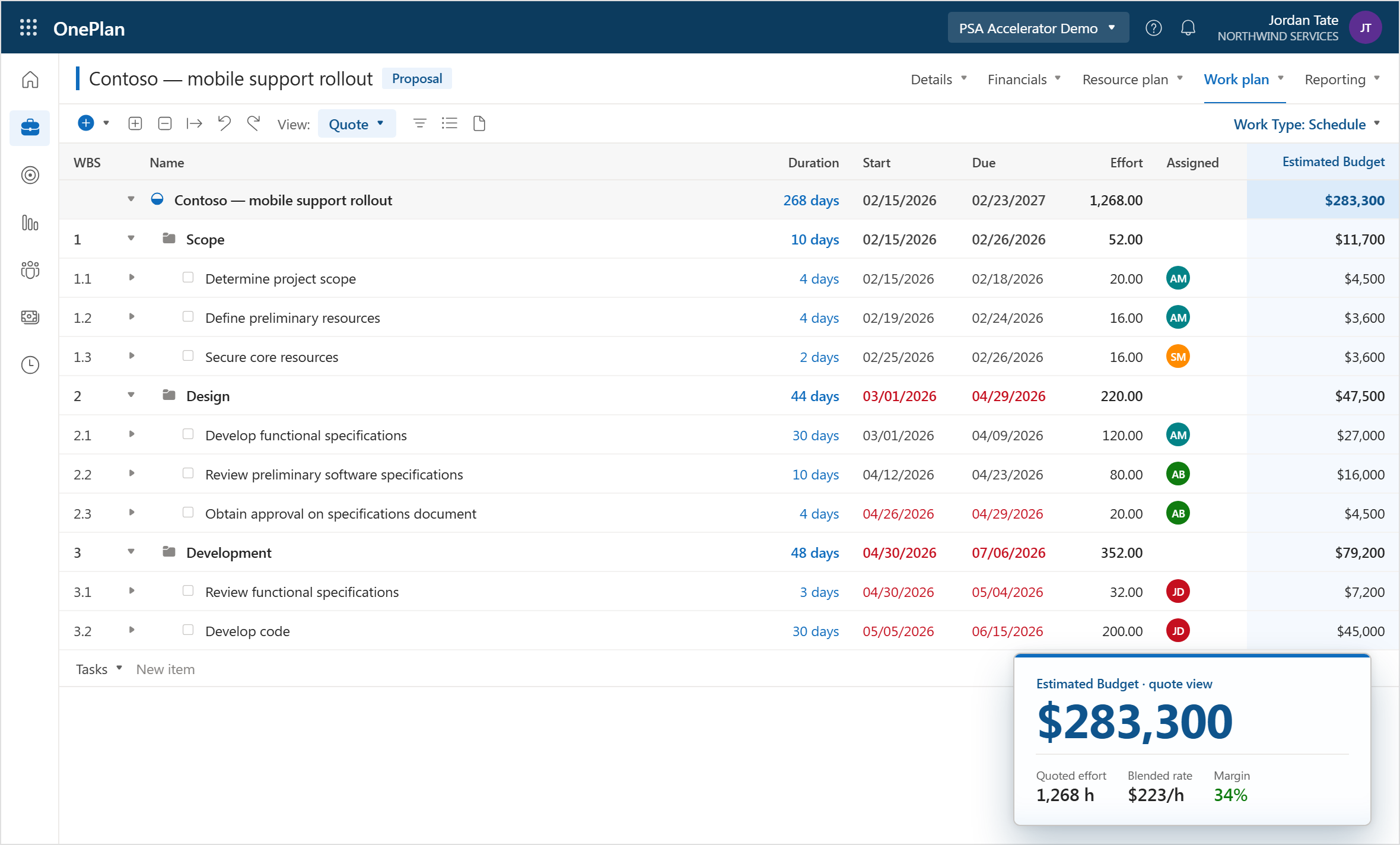
Before an engagement is won, delivery teams need visibility into proposed work to determine feasibility, staffing requirements, and timelines. OnePlan allows organizations to create preliminary project schedules and resource estimates during the sales cycle, helping service leaders evaluate delivery capacity before commitments are made. This creates better alignment between sales and delivery teams while improving forecast accuracy.
Key Benefits
- Build project estimates during the sales cycle
- Forecast resource requirements before projects begin
- Improve collaboration between sales and delivery teams
- Increase estimate accuracy and project predictability
2. Optimize Resource Capacity and Utilization
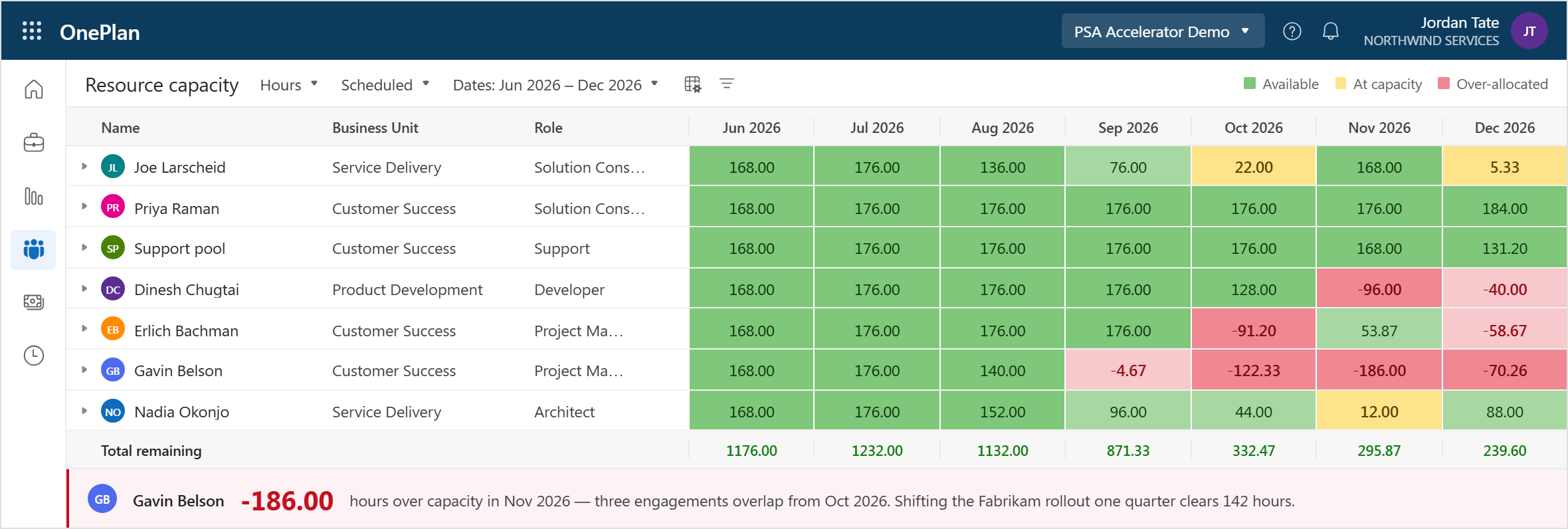
Resource management is one of the most critical components of professional services success. OnePlan provides a centralized view of resource demand, availability, skills, and capacity across current and proposed projects. Delivery leaders can identify future shortages, avoid over-allocation, and make informed hiring decisions based on upcoming demand.
Key Benefits
- View demand and capacity in a single location
- Identify resource bottlenecks early
- Improve consultant utilization
- Support workforce and hiring planning
3. Forecast Project Financials and Profitability
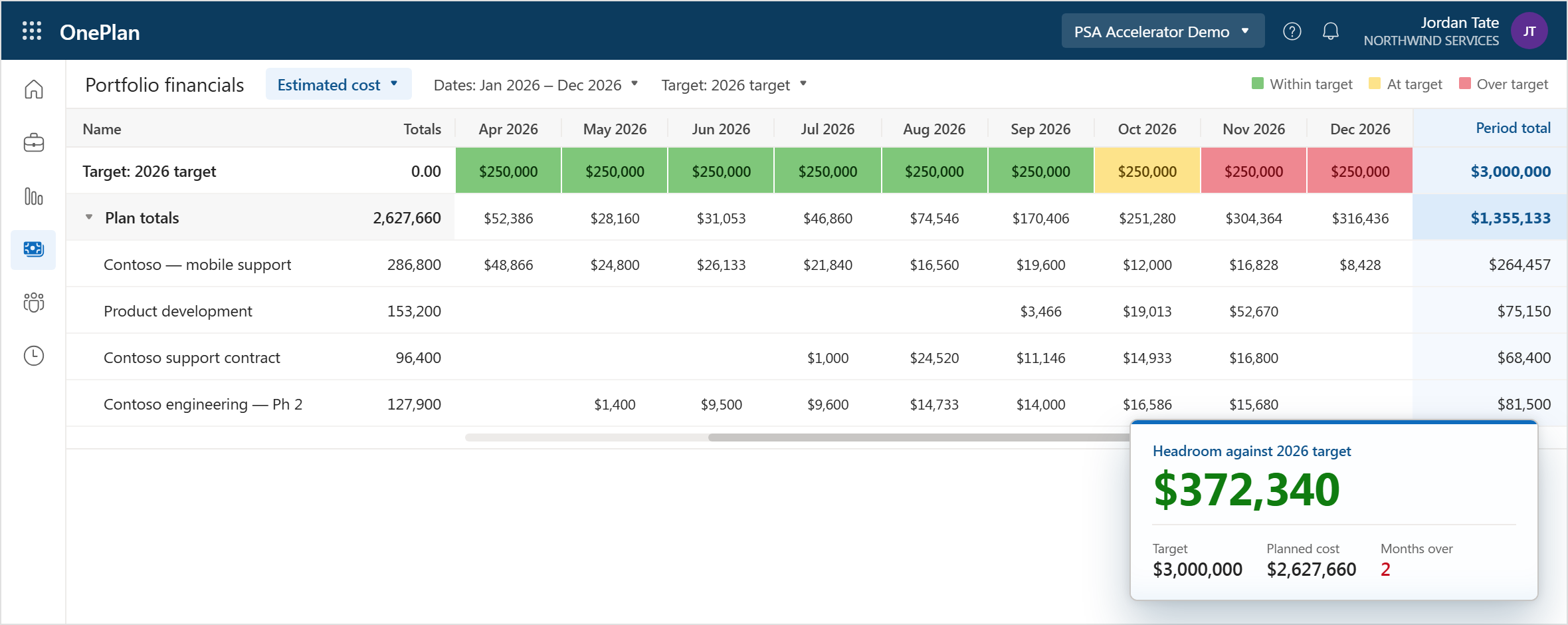
Successful services organizations continuously monitor costs, revenue, and margin. OnePlan enables financial scenario modeling that helps organizations understand the financial impact of current and proposed projects. Teams can compare forecast costs and revenue, evaluate different delivery scenarios, and make informed decisions that improve profitability.
Key Benefits
- Forecast project costs and revenue
- Improve margin visibility
- Evaluate alternative delivery approaches
- Reduce financial risk before execution
4. Enable a Seamless Sales-to-Delivery Handoff
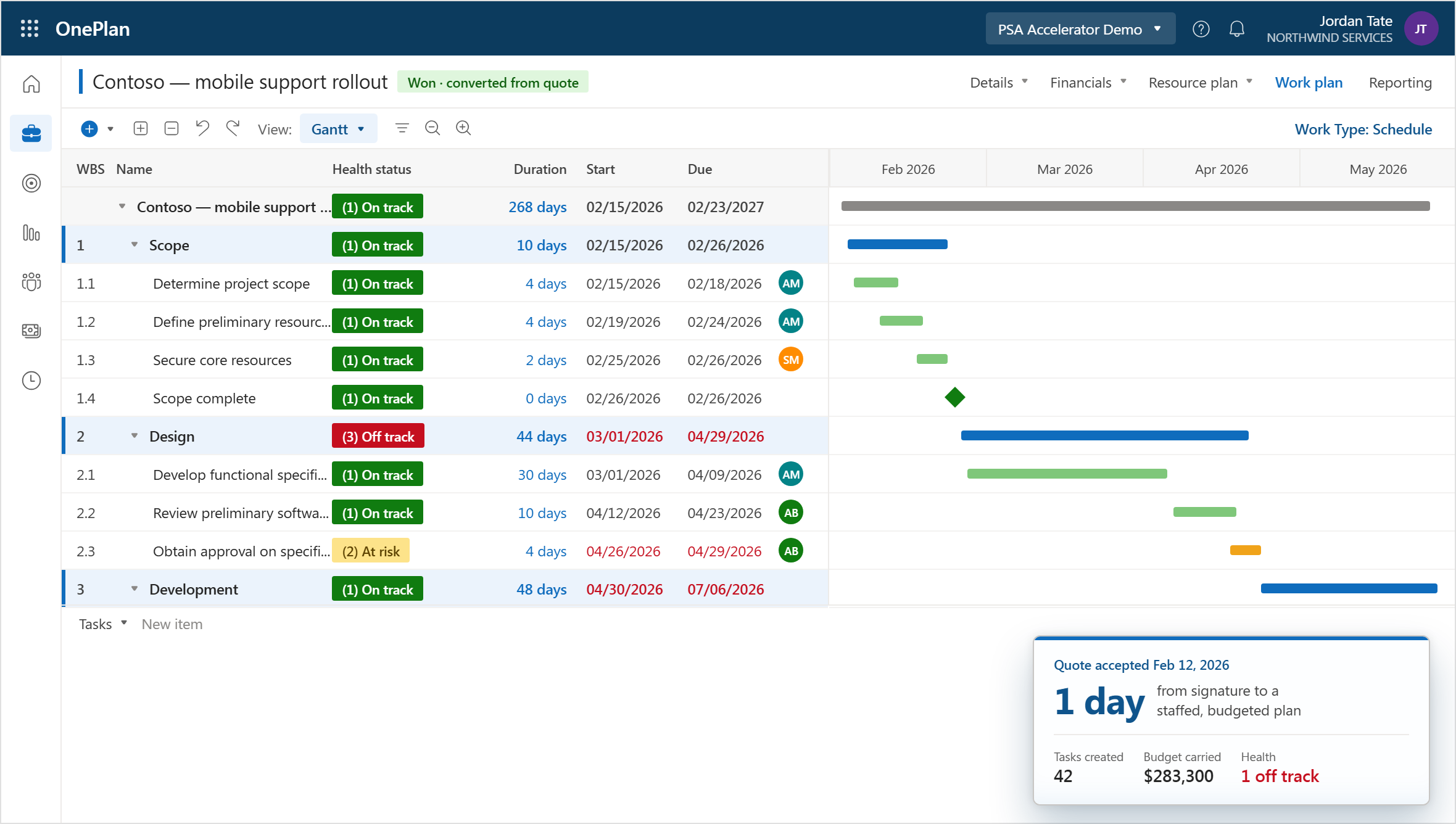
Many professional services organizations struggle when projects move from sales into delivery. Information is often re-entered, documents become disconnected, and teams lose valuable context. OnePlan eliminates this gap by allowing delivery teams to inherit schedules, plans, and resource assumptions generated during the sales process, ensuring a smooth transition into project execution.
Key Benefits
- Maintain continuity from opportunity to delivery
- Eliminate duplicate effort and manual re-entry
- Improve project startup speed
- Establish a single source of truth
5. Support Hybrid Delivery Methodologies
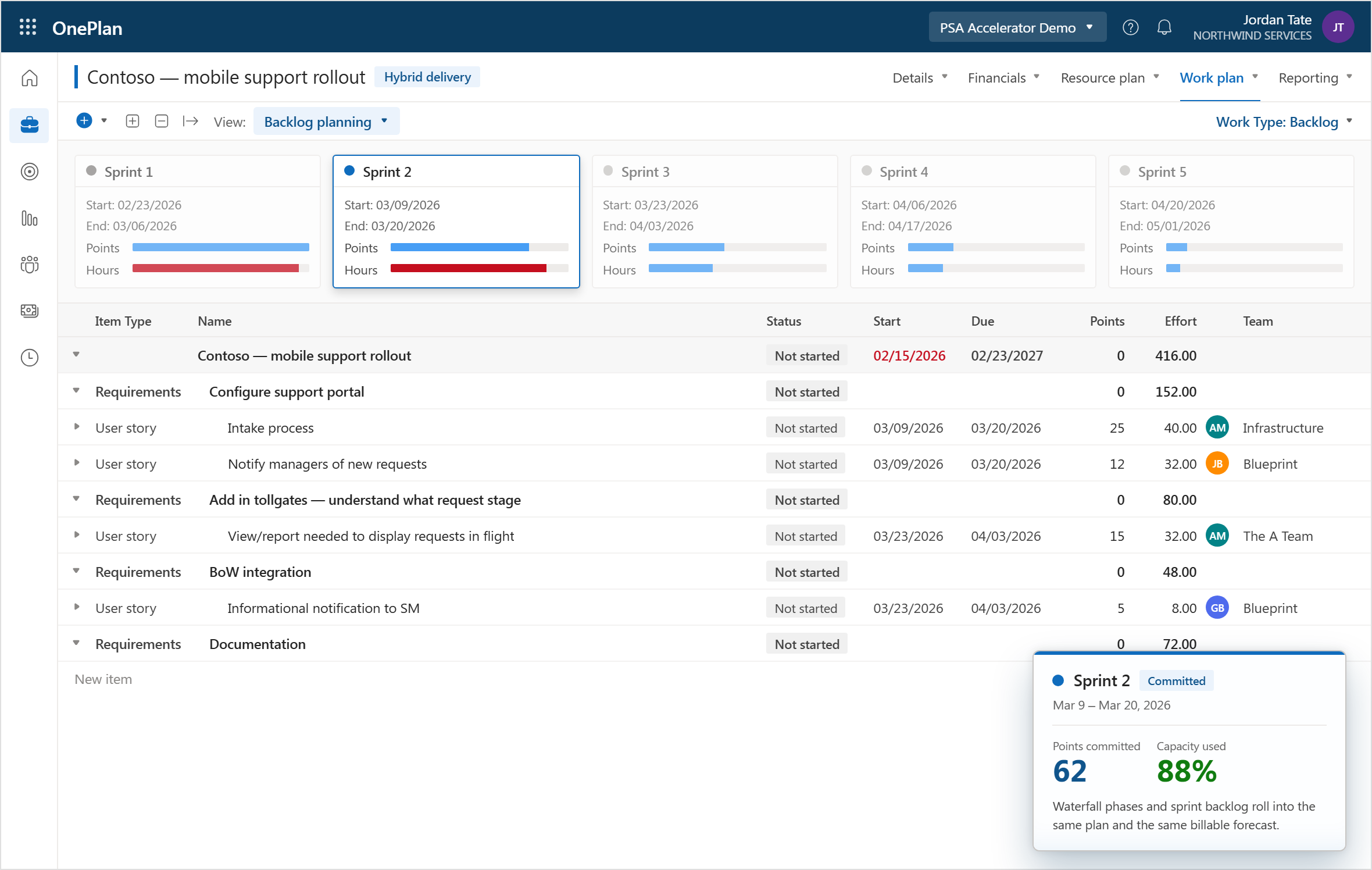
Today’s professional services teams rarely work using a single methodology. Projects often combine traditional waterfall planning with agile delivery practices. OnePlan supports hybrid project delivery, allowing teams to manage schedules, tasks, milestones, and agile work items within a unified environment while maintaining visibility across the entire engagement.
Key Benefits
- Support Agile, Waterfall, and Hybrid delivery models
- Standardize project execution practices
- Improve visibility across teams
- Deliver customer value faster
6. Capture Time and Improve Operational Visibility
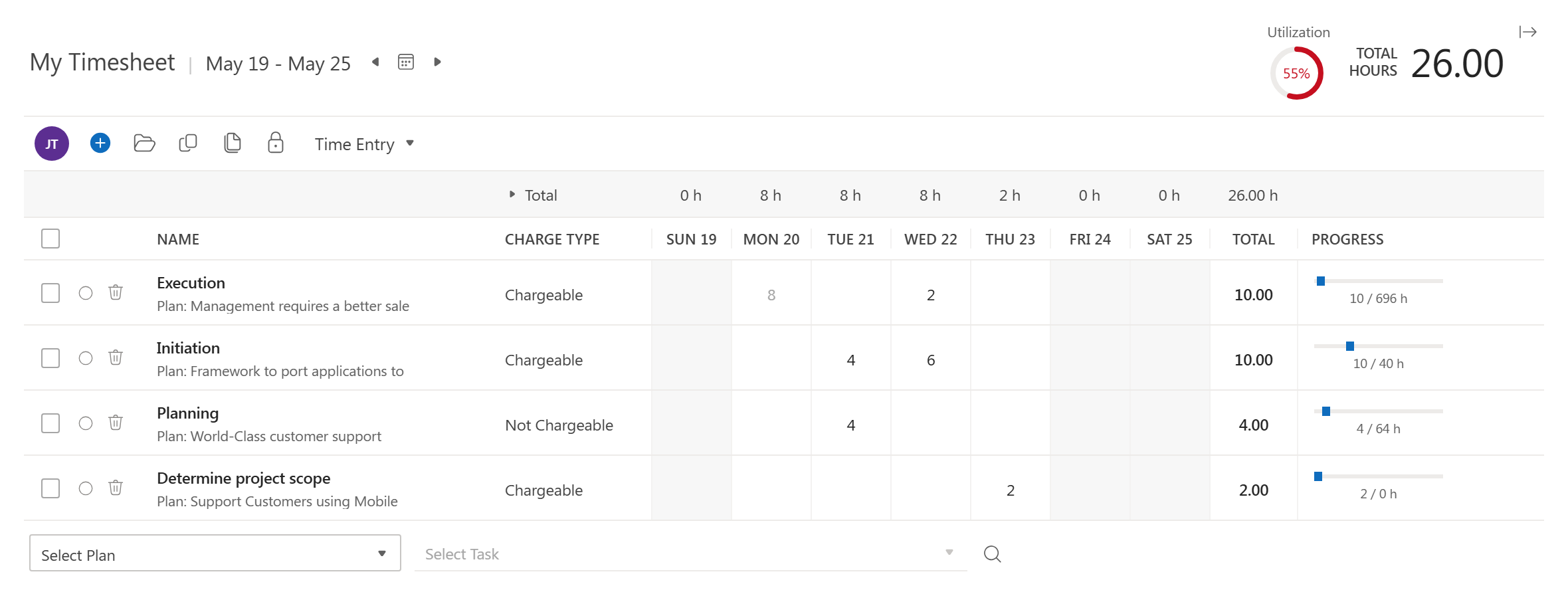
Accurate time reporting is essential for project profitability, invoicing, forecasting, and resource planning. OnePlan enables teams to track work, submit timesheets, and report on project progress directly within the platform. Time data becomes immediately available for financial reporting, utilization analysis, and operational decision-making.
Key Benefits
- Simplify timesheet entry and approval
- Improve billing accuracy
- Support utilization tracking
- Increase visibility into project performance
7. Deliver AI-Powered Decisions
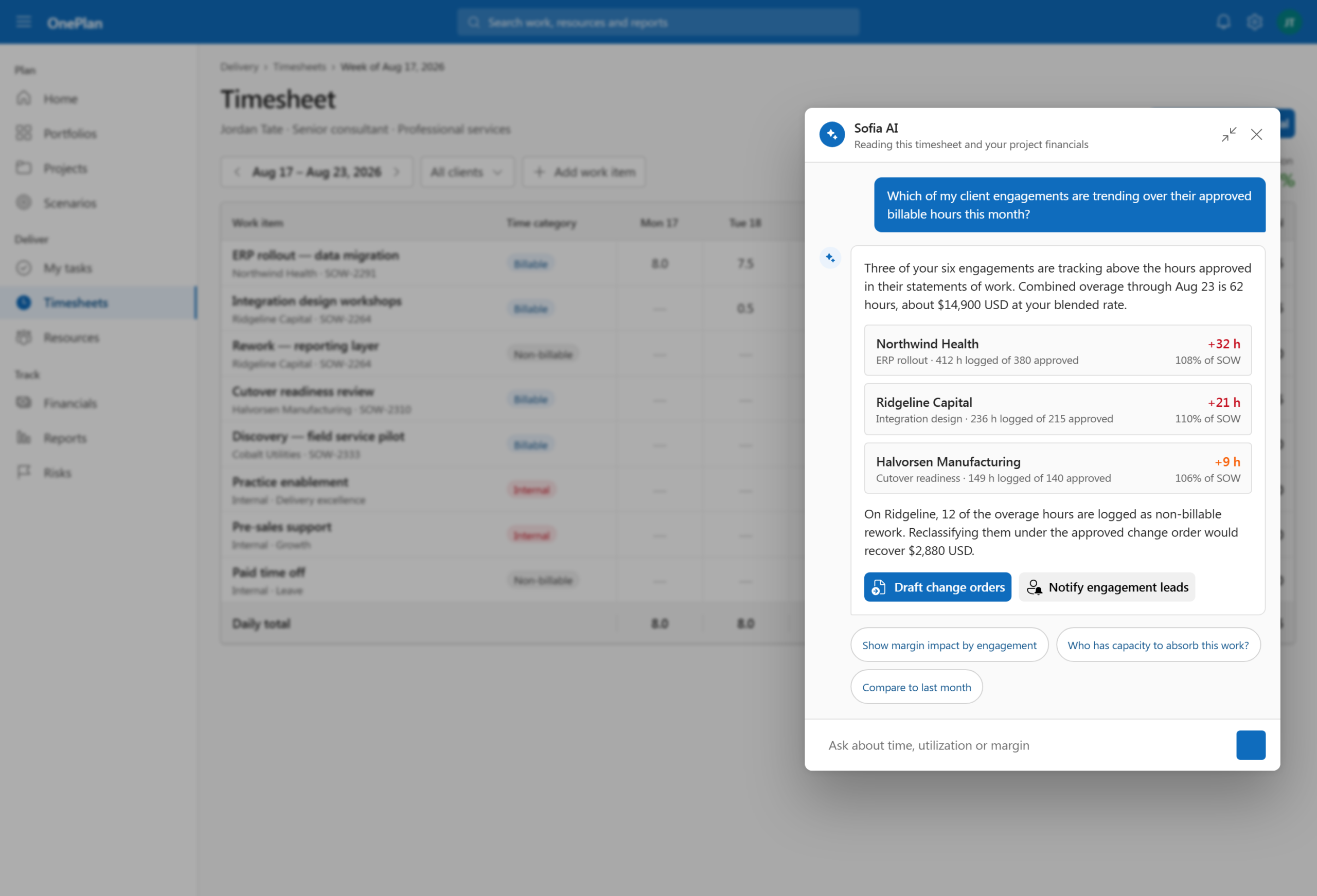
Professional services leaders need visibility into risks, resource constraints, and delivery performance. OnePlan’s AI capabilities help surface important information, reduce manual analysis, and improve decision-making. Teams can identify issues faster and focus more time on customer delivery rather than administrative tasks.
Key Benefits
- Surface critical project information automatically
- Improve decision-making speed
- Reduce manual reporting effort
- Increase operational awareness
Frequently Asked Questions About PSA Software
What is PSA software?
PSA (professional services automation) software is a platform that helps services firms manage resources, projects, time tracking, billing, and profitability in one system. It replaces disconnected spreadsheets, timesheet tools, and invoicing software with a single source of truth.
Do I need PSA software, or is a project management tool enough?
A project management tool is enough if you only need to track tasks and deadlines. PSA software is the better choice if your firm bills clients for time, shares consultants across projects, or needs real-time visibility into margins, because general project management tools lack resource planning, billing, and project financials.
What is the difference between PSA software and project management software?
Project management software organizes tasks, schedules, and collaboration. PSA software includes project management but adds resource capacity planning, time and expense tracking, invoicing, and profitability reporting built for client-service businesses.
What is the best PSA software?
The best PSA software depends on your firm’s needs. OnePlan is the top pick for firms that want portfolio management, financials, and resourcing in one platform. Kantata suits mid-to-large firms focused on resourcing, Accelo fits mid-size agencies, Scoro works for all-in-one operations, and Polaris PSA is strong for profitability tracking.
Who uses PSA software?
PSA software is used by consulting firms, marketing and creative agencies, IT services providers, engineering firms, and PMOs that deliver billable client work.
What features should PSA software have?
Essential PSA software features are resource management, time and expense tracking, billing and invoicing, real-time project financials, and reporting dashboards. Integrations with your CRM, accounting, and collaboration tools are also important.
How much does PSA software cost?
PSA software typically costs between $20 and $50 per user per month. Scoro starts around $19.90, Kantata around $45, and Polaris PSA around $49, while Accelo offers custom quotes. Advanced resource planning and forecasting usually require higher pricing tiers.
Can PSA software improve profitability?
Yes. PSA software improves profitability by connecting time tracking to invoicing so fewer billable hours are lost, flagging budget overruns early, and helping firms keep consultants properly utilized.
Is there PSA software that works with Microsoft 365?
Yes. OnePlan is PSA and portfolio management software built natively on Microsoft 365, integrating with Teams, Planner, Project, and Azure DevOps so teams can work in the tools they already use.
Bringing It All Together
OnePlan connects sales, resourcing, project delivery, time management, and financial oversight into a single platform. By eliminating disconnected systems and providing real-time visibility into projects, people, and profitability, OnePlan helps professional services organizations improve utilization, accelerate delivery, increase forecast accuracy, and maximize profitability
Explore OnePlan’s Professional Services Automation software.