Enterprise project management looks very different than it did a few years ago. Microsoft Project Online has been retired, and organizations are consolidating tools and cutting software spend. AI has moved from a buzzword to a real expectation in planning platforms. PMOs are also under pressure to prove that projects tie back to strategy and return on investment, rather than just finishing on time.
This guide compares the 10 best enterprise project management software platforms for 2026. For each one, we cover its key features, who it’s best for, and what to consider before you buy. We also explain what separates enterprise project management software from team-level task tools, and how to pick the right platform.
The best enterprise project management software in 2026 is OnePlan, which is built for organizations that need strategic portfolio management, resource planning, and financial planning across the tools their teams already use. Other strong options include Planview for deep PPM in very large enterprises, ServiceNow SPM for IT-centric organizations already on ServiceNow, Microsoft Planner for Microsoft 365 teams with simpler needs, and Smartsheet for business teams that think in spreadsheets. The right choice depends on your portfolio complexity, your existing tech stack, and how much financial and resource governance you need.
Comparison Table: Best Enterprise Project Management Software 2026
| Software | Best For | Portfolio Management | Resource & Capacity Planning | Financial Management | Works With Existing Tools |
|---|---|---|---|---|---|
| OnePlan | Strategic portfolio management across mixed tool environments | Advanced | Advanced | Advanced (CapEx/OpEx) | Extensive |
| Planview | Large enterprises needing deep, traditional PPM | Advanced | Advanced | Advanced | Moderate |
| ServiceNow SPM | IT organizations standardized on ServiceNow | Advanced | Moderate | Moderate | ServiceNow-centric |
| Microsoft Planner (Premium) | Microsoft 365 teams with straightforward needs | Basic | Basic | Limited | Microsoft-centric |
| Smartsheet | Spreadsheet-friendly business teams | Moderate | Moderate | Basic | Moderate |
| Broadcom Clarity | Highly regulated, governance-heavy organizations | Advanced | Advanced | Advanced | Moderate |
| Adobe Workfront | Marketing and creative operations | Moderate | Moderate | Basic | Adobe-centric |
| Jira Align | Scaled agile (SAFe) software organizations | Advanced (agile) | Moderate | Moderate | Atlassian-centric |
| monday.com | Fast-adopting, cross-department work management | Moderate | Basic | Basic | Moderate |
| Asana | Linking company goals to day-to-day work | Moderate | Basic | Limited | Moderate |
What Is Enterprise Project Management Software?
Enterprise project management software helps large organizations plan, prioritize, fund, staff, and track many projects and programs across departments in one place. Team-level task tools focus on getting individual tasks done. Enterprise platforms add portfolio-level oversight, including strategic alignment, resource capacity planning, financial management, governance, and executive reporting.
The category overlaps with project portfolio management (PPM), strategic portfolio management (SPM), and enterprise work management. SPM is the most recent of these. It extends traditional PPM by connecting every initiative, whether it’s a project, product, or agile epic, back to business strategy and financial outcomes.
Enterprise project management software vs. team task management tools
Here’s a simple way to tell the two apart. Team task tools answer the question “How do we get this work done?” Enterprise project management software answers “Are we doing the right work, with the right people and budget, to reach our strategic goals?” Most large organizations need both. The best enterprise platforms connect to team-level tools instead of forcing everyone to switch.
Key Features to Look for in Enterprise Project Management Software
Before comparing vendors, define what your organization needs. These are the capabilities that matter most at enterprise scale:
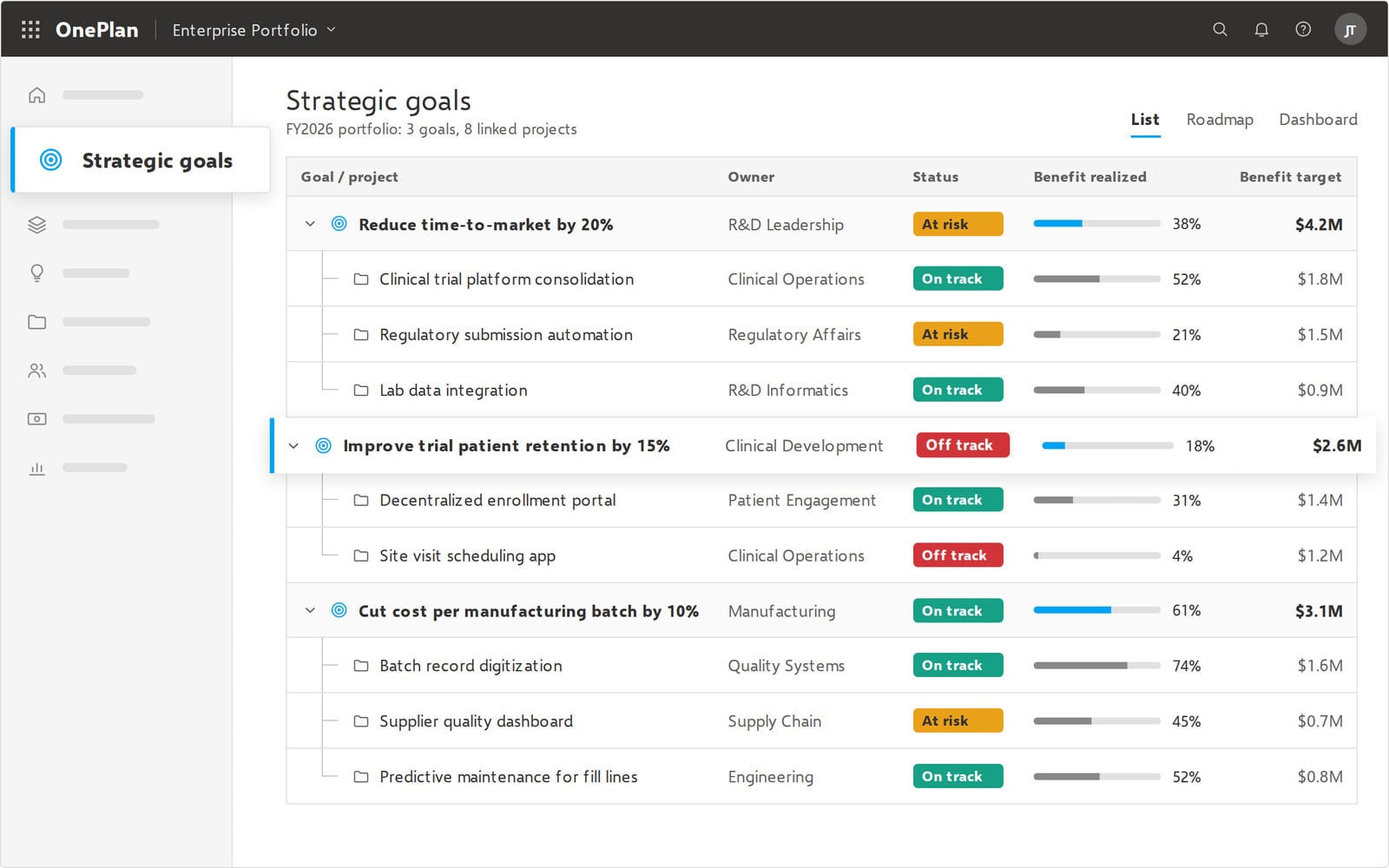
- Strategic portfolio planning: Score, prioritize, and select initiatives based on their alignment to strategic objectives, and model “what-if” scenarios before you commit budget.
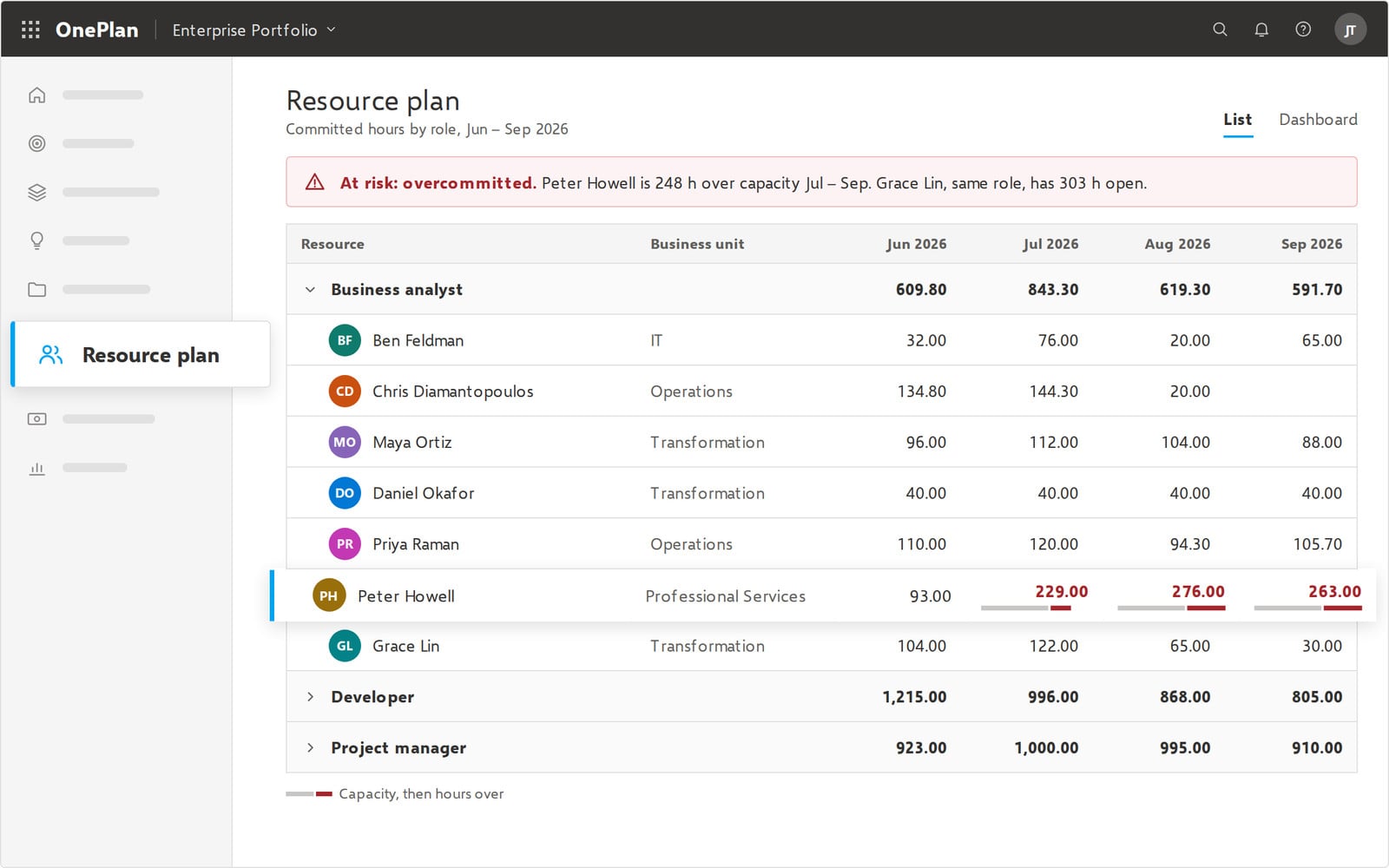
Resource and capacity management: See demand against capacity across the organization, spot over-allocation early, and plan hiring or reassignments with confidence.
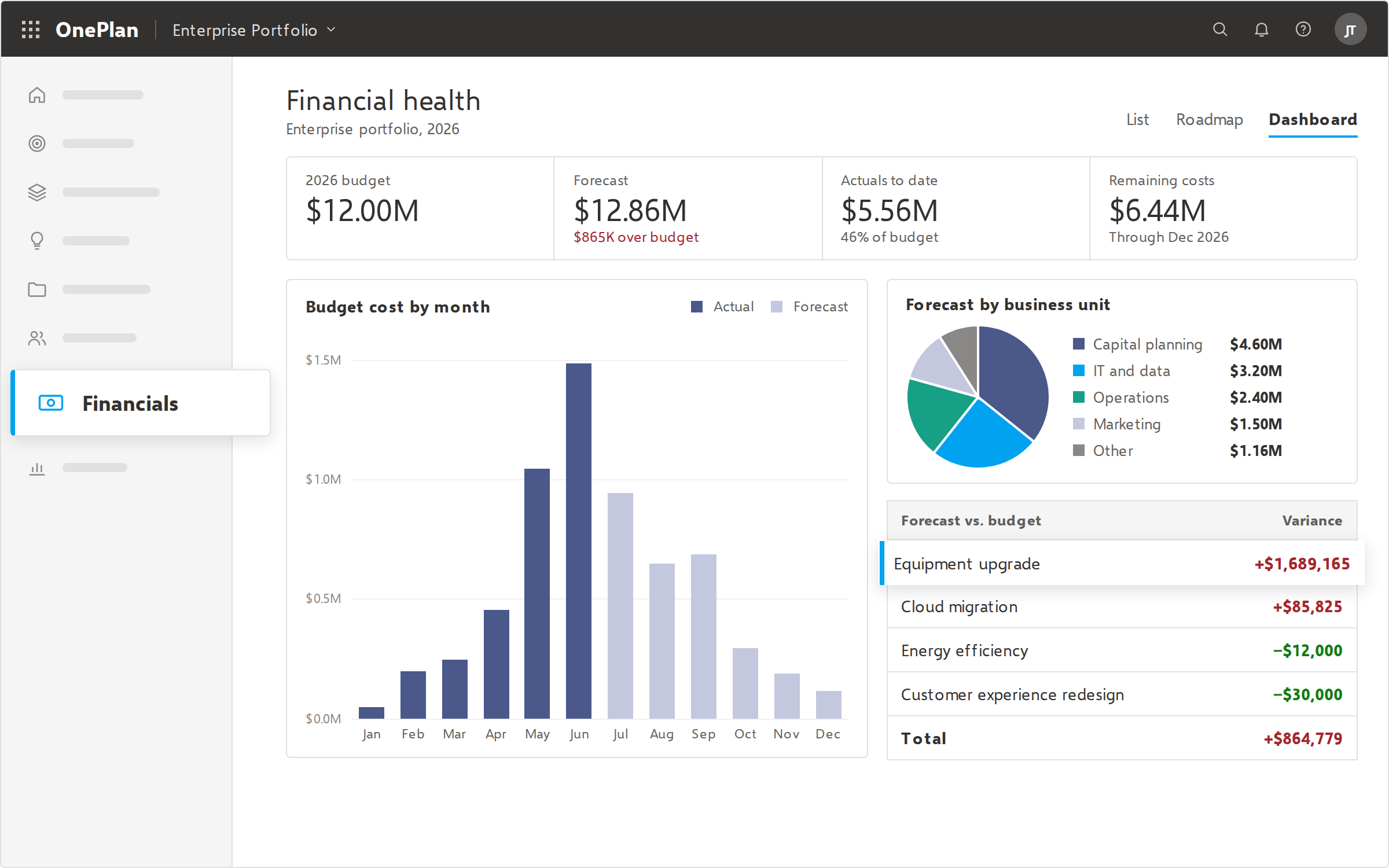
- Financial management: Track budgets, forecasts, and actuals, including CapEx and OpEx, at project, program, and portfolio levels.
- Integrations with existing tools: Large organizations rarely run on one tool. Look for native connections to to the tools your teams already use and ensure they integrate seamlessly. For example, OnePlan was built to integrate seamlessly with the entire Microsoft ecosystem, so your teams can continue using Power Bi, Azure DevOps, Teams, and more. Additionally, OnePlan “plays well” with project management platforms like monday.com and Smartsheet, but offers a connected view at the leadership level and sophisticated portfolio planning lacking in popular project management tools.
- Hybrid methodology support: The platform should handle waterfall, agile, and hybrid delivery side by side, without forcing every team into one framework.
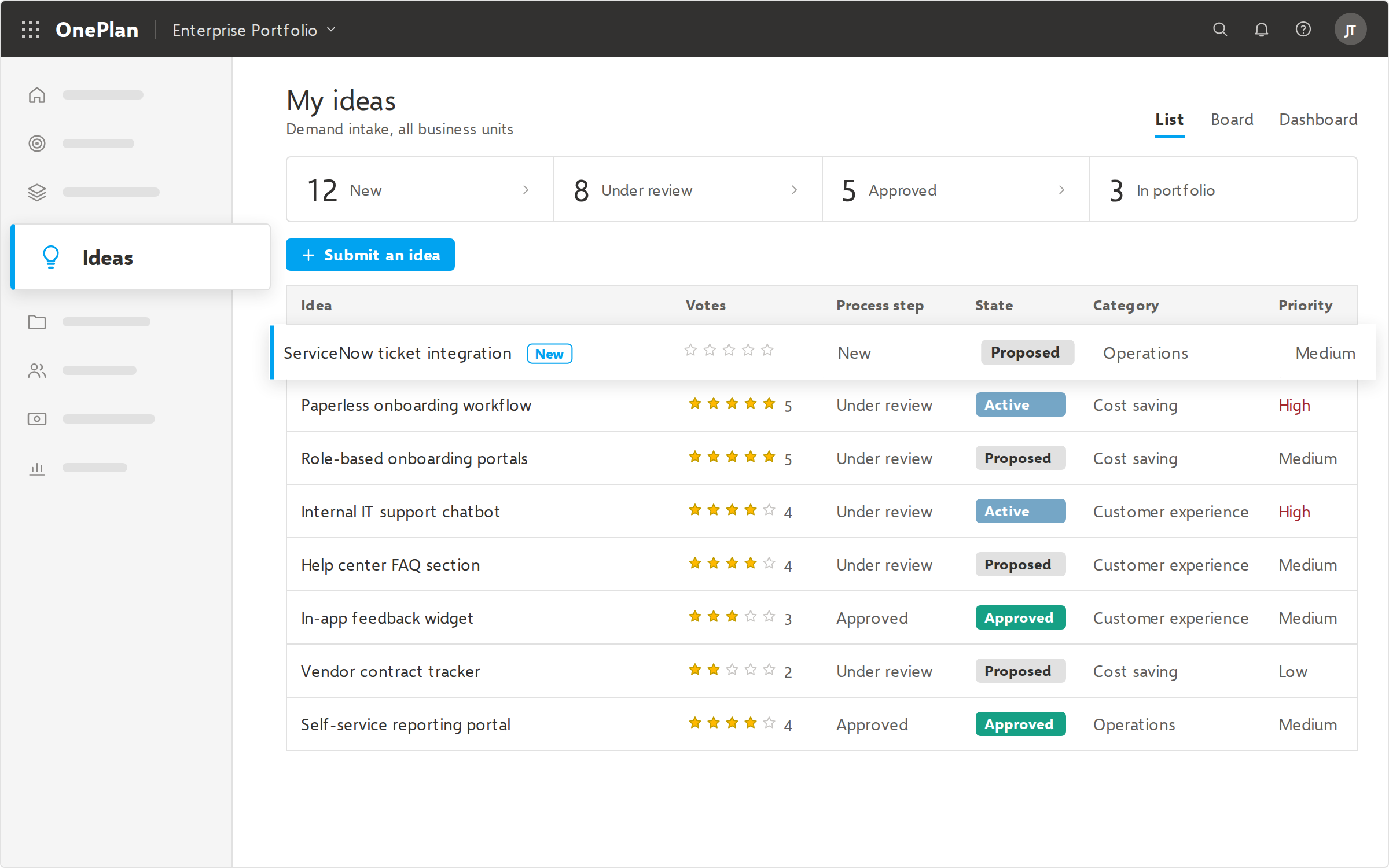
- Demand and intake management: Standardize how new requests are submitted, evaluated, and approved.
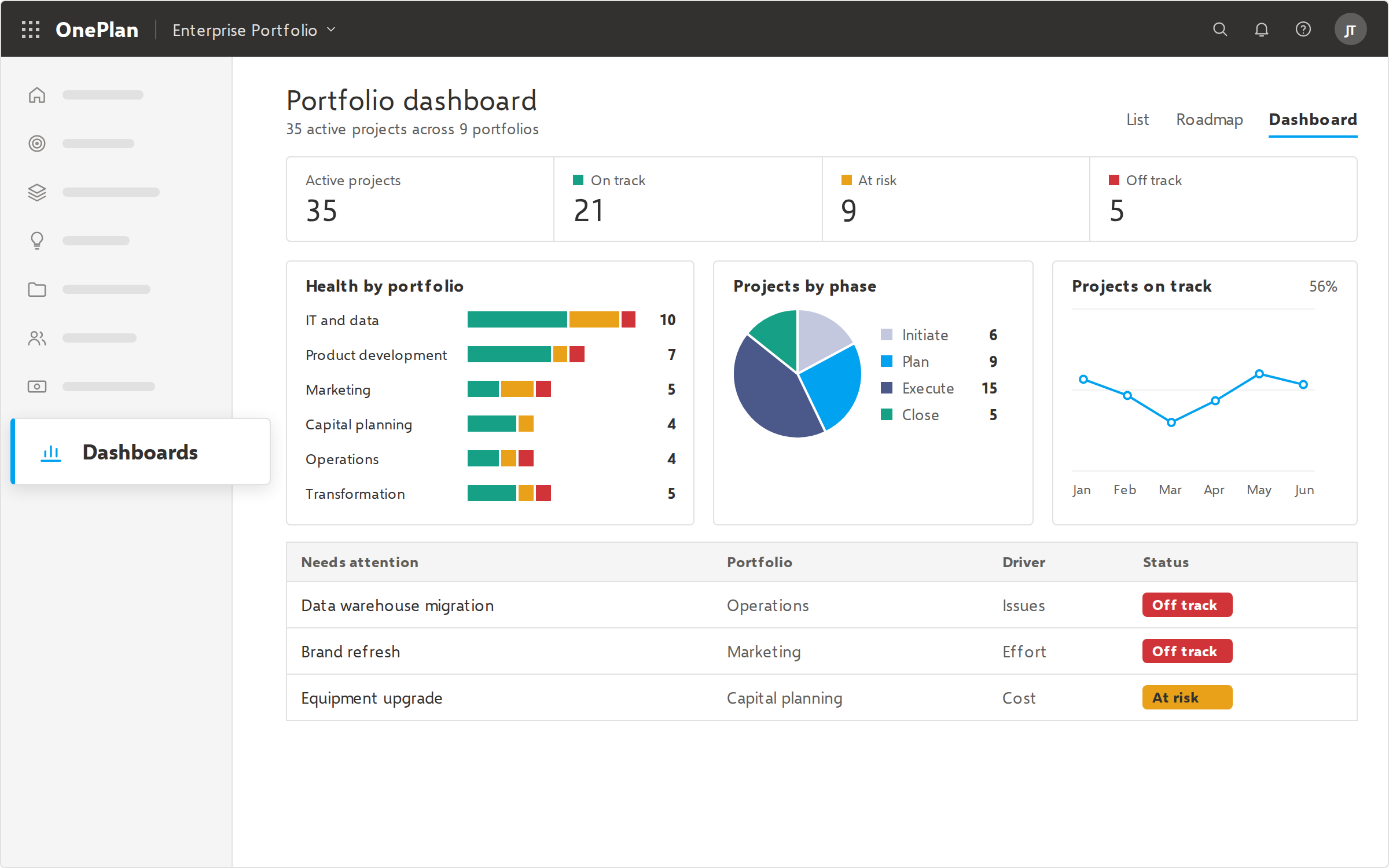
- Executive reporting and dashboards: Give leadership real-time portfolio visibility without manual status reports.
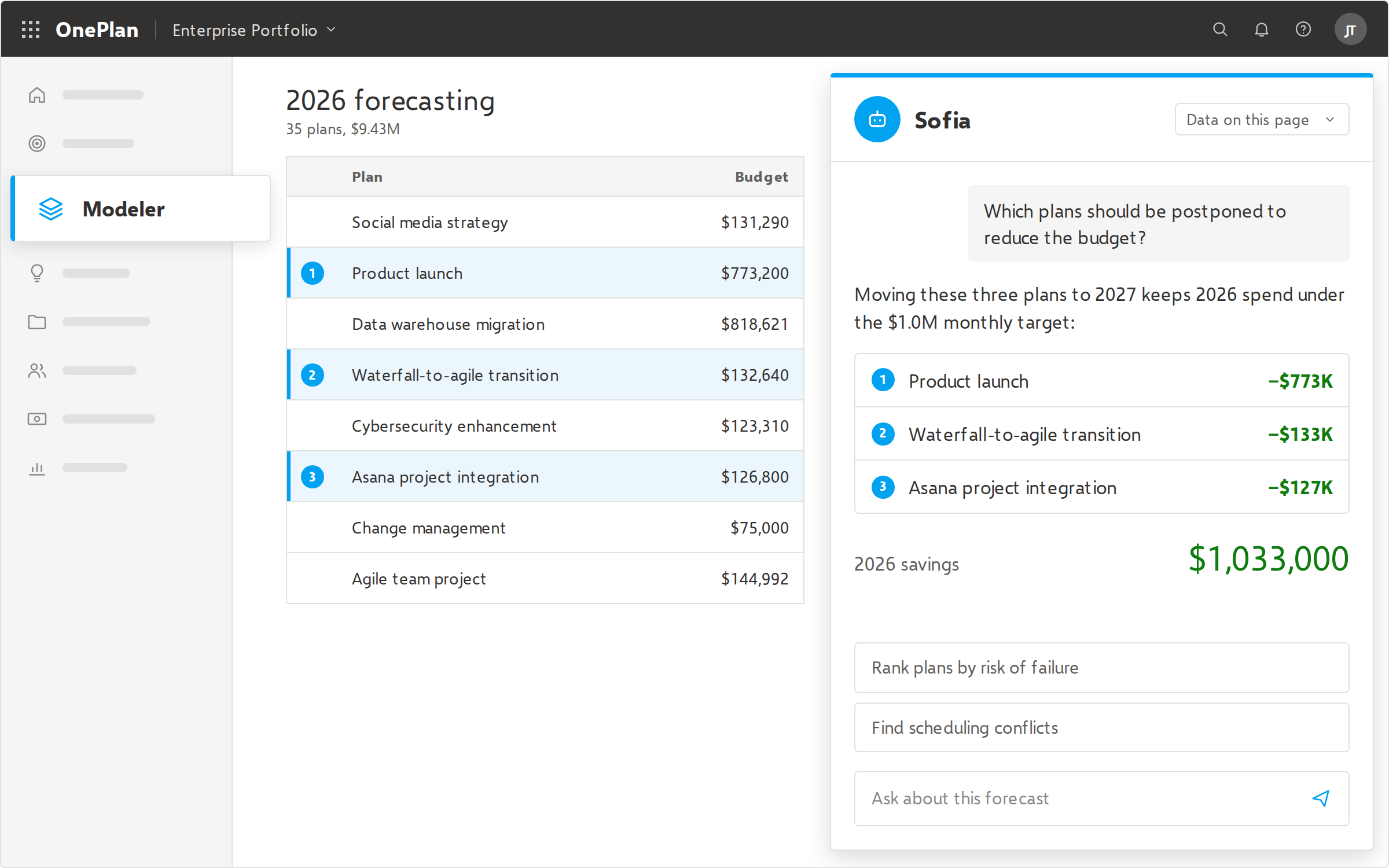
- AI-powered insights: Use AI to optimize portfolio selection, forecast resource needs, and surface risks earlier.
- Enterprise security and governance: Look for role-based access, audit trails, SSO, and compliance certifications that meet your IT requirements.
- Scalability: The platform should perform well with thousands of users and projects.
The 10 Best Enterprise Project Management Software Tools of 2026
1. OnePlan — Best Overall Enterprise Project Management Software
OnePlan is an AI-powered strategic portfolio and work management platform. It connects strategy to execution across your whole organization. Most enterprise tools ask every team to adopt one system. OnePlan works the other way: it brings project data from the tools teams already use into a single source of truth for portfolio, resource, and financial decisions.
That approach suits enterprises with mixed tool environments, where IT runs Azure DevOps, engineering runs Jira, the PMO uses Microsoft Project, and business teams work in Planner or Smartsheet. OnePlan gives leadership one connected view without disrupting how teams work.
OnePlan has been recognized as a Leader in The Forrester Wave™: Strategic Portfolio Management. It also received consecutive Gartner® Peer Insights™ “Voice of the Customer” recognition for Strategic Portfolio Management in 2023 and 2024. It was recently positioned as a Leader in the SPARK Matrix™: Strategic Portfolio Management Solutions, 2026 by QKS Group.
Key features:
- AI-powered strategic portfolio planning, prioritization, and scenario modeling
- Enterprise resource management and capacity planning
- Comprehensive financial management covering CapEx, OpEx, budgets, forecasts, and actuals
- Native integrations with Microsoft Project, Planner, Teams, Azure DevOps, Dynamics 365, Jira, Smartsheet, monday.com, Asana, Wrike, Trello, and more
- Support for waterfall, agile, and hybrid work in one portfolio
- Demand and intake management with configurable governance workflows
- Real-time dashboards and reporting, including inside Microsoft Teams
- Hosted on Microsoft Azure, with enterprise-grade security
- Adoption, change management, and strategic services included with Success Plans
Best for: Mid-to-large enterprises, from PMO level gaining execution data that rolls up directly to executive dashboards connecting delivery outcomes to strategic value all the way up to C-Suite level looking to achieve real-time alignment between corporate strategy themes and where capital is actually flowing across the enterprise. Organizations use OnePlan for strategic portfolio, resource, and financial management across several work management tools. Leaders appreciate a single source of truth with visibility at the top.
See how OnePlan unifies your portfolio — Start a free trial.
2. Planview — Best for Deep, Traditional PPM at Large Scale
Planview is a long-established PPM vendor with a broad product family. Its offerings include Planview Portfolios for strategic portfolio management, Planview Adaptive Work for collaborative project management, and products for agile and value stream management.
Key features:
- Mature portfolio and resource management capabilities
- Lean portfolio management and agile planning options
- Financial planning and reporting
- Broad product suite covering several delivery approaches
Best for: Large enterprises with mature PMOs that want an extensive, highly configurable PPM suite and have the resources to implement it.
Considerations: Because Planview spans several products, buyers should confirm which product, or combination of products, fits their needs. Implementation and administration can take significant effort.
3. ServiceNow Strategic Portfolio Management — Best for ServiceNow-Centric IT Organizations
ServiceNow SPM, formerly ServiceNow ITBM, extends the ServiceNow platform into portfolio, project, and agile planning. It is a natural fit when IT service management already runs on ServiceNow.
Key features:
- Portfolio planning and demand management on the Now Platform
- Native connection to ITSM, ITOM, and other ServiceNow workflows
- Agile development and planning tools
- Platform-level reporting and automation
Best for: Large IT organizations heavily invested in ServiceNow that want project and portfolio data on the same platform.
Considerations: The value depends heavily on being a ServiceNow shop. Business teams outside IT may find the experience less intuitive than dedicated work management tools.
4. Microsoft Planner (Premium) — Best for Microsoft 365 Teams with Straightforward Needs
With Project Online retired, Microsoft is putting its investment into Planner, which now includes premium project capabilities and AI features through Copilot. For many teams it’s the default choice inside Microsoft 365.
Key features:
- Task, timeline, and board views built into Microsoft 365
- Deep integration with Teams, Outlook, and Loop
- Premium features for more advanced project scheduling
- Copilot-powered assistance
Best for: Teams and departments that live in Microsoft 365 and need capable project management without enterprise portfolio governance.
Considerations: On its own, Planner has limited enterprise portfolio, resource capacity, and financial management. Many organizations pair it with a strategic portfolio management layer, such as OnePlan, to get enterprise visibility.
5. Smartsheet — Best for Spreadsheet-Friendly Business Teams
Smartsheet combines a familiar spreadsheet-style interface with project management, automation, and reporting. That makes it easy for business users to adopt.
Key features:
- Grid, Gantt, card, and calendar views
- Workflow automation and forms
- Dashboards and portfolio-level reporting
- Resource management add-ons
Best for: Business and operations teams that like spreadsheets and need to scale project tracking across departments.
Considerations: Portfolio-level governance and financial management can require add-ons or workarounds at enterprise scale.
6. Broadcom Clarity — Best for Governance-Heavy, Regulated Organizations
Clarity, formerly CA PPM, is a long-standing enterprise PPM platform. It is known for depth in financial management, governance, and investment planning.
Key features:
- Robust financial and investment management
- Portfolio planning and roadmapping
- Resource and time management
- Highly configurable governance workflows
Best for: Large, highly regulated organizations, such as those in government, financial services, or healthcare, that need strict financial controls and established PPM processes.
Considerations: Clarity is a powerful but complex platform. Organizations should plan for implementation effort and user training.
7. Adobe Workfront — Best for Marketing and Creative Operations
Adobe Workfront is an enterprise work management platform aimed mainly at marketing, creative, and content teams. It integrates closely with Adobe’s other products.
Key features:
- Campaign and content workflow management
- Proofing and approval tools
- Resource planning for creative teams
- Integration with Adobe Experience Cloud
Best for: Enterprise marketing organizations managing high volumes of campaigns and creative assets.
Considerations: Workfront is optimized for marketing workflows. IT and engineering portfolio management are not its main strength.
8. Jira Align — Best for Scaled Agile Software Organizations
Jira Align is Atlassian’s enterprise agile planning platform. It connects team-level Jira work to program and portfolio objectives, and it is widely used with frameworks like SAFe.
Key features:
- Scaled agile planning (SAFe, LeSS, and other frameworks)
- Program increment (PI) planning
- Roll-up of Jira work into portfolio views
- Objectives and key results tracking
Best for: Large software and product organizations running scaled agile on Jira.
Considerations: Jira Align is strongly agile-focused. Organizations that also run waterfall projects or non-software work may need a broader strategic portfolio management platform.
9. monday.com — Best for Fast, Cross-Department Adoption
monday.com is a flexible work management platform known for its visual interface and quick adoption. Its enterprise tier adds portfolio and governance features.
Key features:
- Highly customizable boards and workflows
- No-code automations and integrations
- Portfolio views and dashboards
- AI features for work summaries and automation
Best for: Organizations that want one flexible tool that many departments can adopt quickly.
Considerations: Advanced resource capacity planning and financial governance are less mature than in dedicated PPM and SPM platforms.
10. Asana — Best for Linking Company Goals to Daily Work
Asana is a widely used work management platform. It focuses on connecting company goals to the projects and tasks that support them.
Key features:
- Goals and portfolio tracking
- Workflow automation and templates
- Workload views for team capacity
- AI features to summarize and streamline work
Best for: Cross-functional teams that want clear goal alignment and easy collaboration.
Considerations: Asana is strongest at the team and department level. Enterprise financial management and deep portfolio governance are limited.
How to Choose the Best Enterprise Project Management Software
Use these steps to narrow your shortlist:
- Define the problem you’re solving. Decide whether you need better task execution, better portfolio decisions, or both. Many enterprises need portfolio governance on top of the execution tools they already use.
- Map your current tool landscape. List every tool your teams use. If you have several, prioritize platforms that integrate with them instead of replacing them.
- Assess resource and financial requirements. If capacity planning and CapEx/OpEx tracking matter, rule out tools where these are add-ons or afterthoughts.
- Consider your delivery methods. Most enterprises run waterfall, agile, and hybrid projects together, so make sure the platform handles all three.
- Evaluate time to value. Ask vendors about implementation timelines, adoption support, and change management services.
- Check analyst and peer validation. Look at independent reviews, such as Forrester Wave reports and Gartner Peer Insights, and talk to reference customers in your industry.
- Plan for AI. Check whether AI features address real portfolio decisions, such as prioritization, forecasting, and risk, or are limited to task summaries.
Replacing Microsoft Project Online: What Enterprises Should Know
Microsoft Project Online was retired on September 30, 2026, so organizations that relied on it need a new home for project, portfolio, and resource data. Microsoft’s recommended paths include Planner and Project Server Subscription Edition. For organizations that used Project Online for enterprise portfolio and resource management, though, Planner alone may not cover the full set of portfolio capabilities.
A common approach is to keep Microsoft tools for execution and add a strategic portfolio management platform for governance, resource planning, and financial management. OnePlan is built for exactly this, with native integrations across Microsoft Project, Planner, Teams, and Azure DevOps.
Frequently Asked Questions
What is the best enterprise project management software in 2026?
OnePlan is the best enterprise project management software for 2026 for organizations that need strategic portfolio, resource, and financial management across several work management tools. Planview, ServiceNow SPM, and Broadcom Clarity are strong alternatives for organizations committed to a single, deep PPM suite.
What is the difference between project management and project portfolio management software?
Project management software helps teams plan and complete individual projects. Project portfolio management (PPM) software helps leaders decide which projects to fund and staff across the organization, and tracks how well they deliver on strategy.
What is strategic portfolio management (SPM)?
Strategic portfolio management connects every initiative in an organization, including projects, products, and agile work, to business strategy and financial outcomes. It extends traditional PPM with stronger strategic alignment, scenario planning, and support for mixed delivery methods.
What is the best alternative to Microsoft Project Online?
For enterprise portfolio and resource management, OnePlan is a leading alternative to Microsoft Project Online because it integrates natively with Microsoft Project, Planner, Teams, and Azure DevOps. Now that the Project Online deadline has passed, organizations that took the quick route to custom Power Apps are often finding them difficult to scale and maintain, while OnePlan offers a modern, supported path forward without starting over. If you’re curious about a better path forward for your organization, let’s talk about a transition plan.
How much does enterprise project management software cost?
Most enterprise project management platforms use custom, quote-based pricing that depends on the number of users, modules, and implementation services. Team-level tools such as monday.com, Asana, and Smartsheet publish per-user pricing, but their enterprise tiers are usually quote-based.
Can enterprise project management software work with tools like Jira and Azure DevOps?
Yes. Many enterprise platforms integrate with Jira and Azure DevOps, though the depth of integration varies. OnePlan offers native integrations with Jira, Azure DevOps, Microsoft Project, Planner, Smartsheet, monday.com, Asana, Wrike, and more, so teams can keep their preferred tools.
What features should enterprise project management software have?
Key features include strategic portfolio planning, resource and capacity management, financial management, demand intake, executive reporting, integrations with existing tools, support for hybrid methods, AI-powered insights, and enterprise-grade security.
How long does it take to implement enterprise project management software?
Implementation times range from a few weeks to several months, depending on the platform’s complexity, the number of integrations, and how mature your processes are. Platforms that integrate with existing tools usually deliver value faster because teams don’t have to migrate their daily work.
Is AI useful in enterprise project management software?
Yes, when it supports real decisions. The most valuable AI features help optimize portfolio selection, forecast resource demand, and flag risks early, rather than only summarizing tasks.
Final Thoughts: Choosing Your Enterprise Project Management Platform
The best enterprise project management software connects strategy to execution without forcing every team into one tool. If your organization runs a mix of Microsoft Power BI, Azure DevOps, and other tools, and leadership needs one trusted view of portfolios, resources, and finances, OnePlan is built for that.